Word Weekend Letters & Worlds
- 4.9
- Rating
- 5.00M
- Installs
- Free
- Price
 Analysis by App-foxy
I approached Word Weekend Letters & Worlds as a quick word game rather than a long-form puzzle commitment, and that distinction matters. Its basic promise is simple: find the words, keep moving, and use a spare moment well. In practice, the appeal comes from how easily a short session can fit around everyday interruptions. I can imagine opening it while waiting for an appointment, taking a few turns during a commute, or playing at home when I want something calmer than an action game.
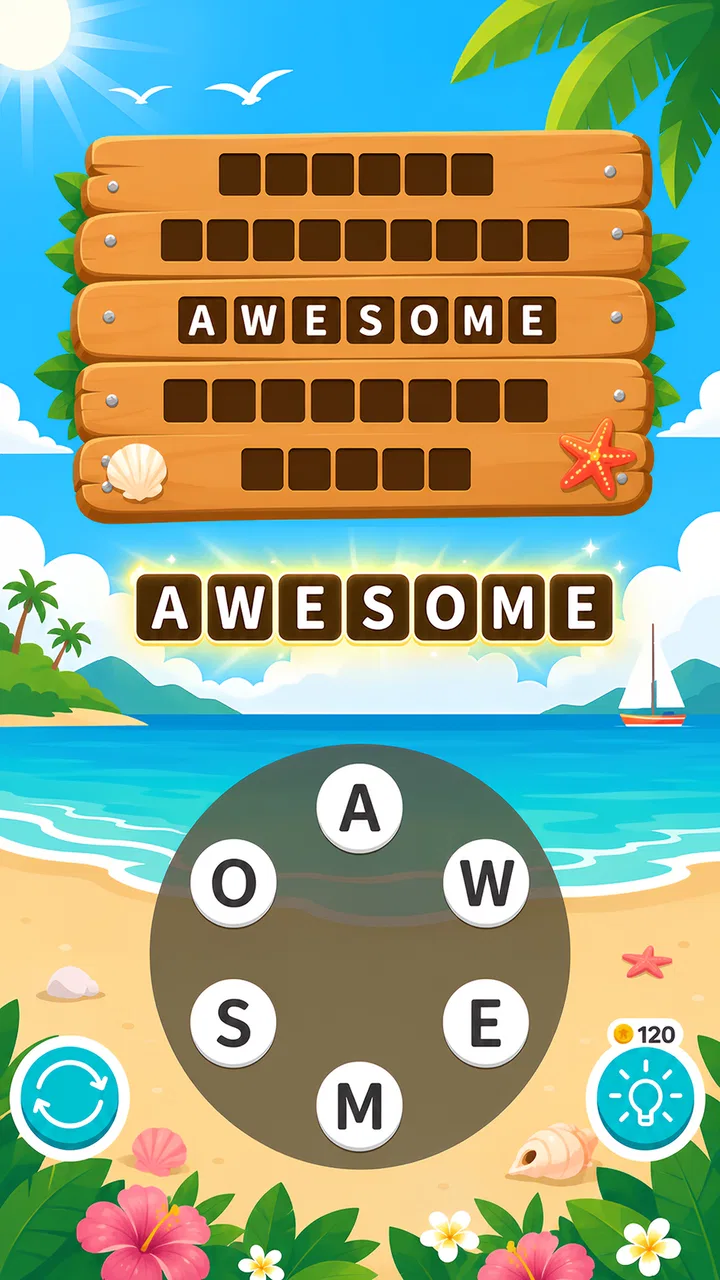
It is a free word game from Brightika, Inc., aimed at an Everyone audience. The store summary, “Guess all words!”, describes the central idea more accurately than any complicated explanation would: this is about recognizing possible words and working through the available letters. The short store description calls it “Word Weekend,” which gives it a relaxed identity, although the real experience depends on whether you enjoy repeated vocabulary challenges more than story or competition.
The game has attracted a 4.9 average from around 64 thousand ratings and has passed 5 million installs. Those figures suggest that the format has a broad audience, but they should not be mistaken for a guarantee that every puzzle style will suit every player. I found the strongest reason to try it is its low barrier to entry. You do not need to learn an elaborate control scheme, understand a fictional world, or reserve a long uninterrupted session.
You May Also Like

 Blood Strike: 2.5 Anniversary
Blood Strike’s Loadouts Turn Every Drop Into a Tactical Gamble
A close look at Blood Strike’s custom loadouts: how fast access to signature weapons reshapes its battle royale rhythm, rewards preparation, and narrows the gap between fights.

 Pandora - Music & Podcasts
Pandora’s Music Is Easy to Start, but Harder to Recover
Pandora’s strength is its low-effort path from a seed to a station. Its weak spot is how much confidence it asks you to place in connection, setup, and quiet recovery.

 8 Ball Pool
 Is Built on Rivalries, Rematches, and Routine
A close look at the rivalries, rematches, shared routines, and unanswered safety questions that turn a quick pool match into a persistent mobile community.

 Samsung Music
’s Quiet Strength Is Playing What You Already Own
Its reach comes less from spectacle than from dependable access to a personal library. That simplicity is both the app’s strongest retention engine and its ceiling.

 AccuWeather: Weather Radar
AccuWeather Review: A Quick, Clear Forecast for Everyday Decisions
For everyday plans, the best forecast is the one you can understand quickly. AccuWeather makes rain timing, radar, and local conditions easy to act on, with a few trade-offs.

 Hill Climb Racing
Why Hill Climb Racing Still Turns Crashes Into One More Run
A tiny car, a bumpy hill and one more upgrade: Hill Climb Racing keeps resurfacing because its simple chaos makes every near-miss feel personal.
More From Our News Desk



Getting past the first points of friction
I’d use this section to make the first session feel more deliberate: check that the game suits your device, then try a few puzzles before deciding whether its word-finding rhythm clicks. A short test also helps separate an unfamiliar word list from a genuine input problem. From there, the next section can focus on getting more satisfying play from each session.
What can make a simple word game feel less simple
The first obstacle is not usually the wordplay itself. It is the expectation that the game should accept every word I consider valid. Word games often rely on a particular vocabulary, and a player may know a perfectly real word that is not recognized in a given puzzle. That can feel like an error even when the game is simply working from a narrower word set. My practical advice is to avoid treating one rejected answer as proof that the level is broken. Try shorter combinations, common forms, and alternate arrangements before assuming the input has failed.
Another point of friction is the difference between seeing letters and seeing possibilities. When I stare at the same group for too long, I tend to repeat the same guesses. A better approach is to change the way I scan: first look for the shortest familiar words, then identify common beginnings or endings, and only afterward search for longer combinations. This is more effective than tapping randomly because it turns the board into a small vocabulary exercise rather than a test of patience.
Players who expect a traditional crossword may also need to adjust. The experience is closer to discovering words from a supplied group of letters than solving detailed clues in a newspaper grid. That makes it more approachable, but it also means the satisfaction comes from pattern recognition and completion rather than from interpreting carefully written definitions. If you prefer cryptic clues, themed trivia, or a large crossword layout, this may feel too direct.
Simple checks before blaming the game
When a puzzle does not respond as expected, I would begin with the basics. I would check that each letter tap is visibly registering, then pause briefly before entering another attempt. Fast tapping can make it difficult to tell whether the issue is a missed touch or an unaccepted word. Closing and reopening the game is also a sensible first step if the interface appears stuck, especially after switching between several apps.
The listed minimum operating system is Android 7.0, so compatibility should be considered before installation on an older device. On a supported phone, I would still keep enough free storage for a normal installation and make sure the operating system is not overloaded with background tasks. These are ordinary checks, but they solve a surprising number of problems that users attribute to the game itself.
The current version is 1.3.5. If the game behaves differently from what you remember, checking whether the installed build is current is worthwhile. I would also avoid repeatedly reinstalling as a first response, since that can interrupt a session and may not address the real cause. A restart, an update check, and a stable connection are more sensible opening steps.
Why installation and starting a session may feel awkward
Because the game is free to install, it is easy to begin without a financial commitment. That does not mean the entire experience is free of commercial choices: in-app purchases are listed from $1.99 to $48.99 per item. I would keep that in mind before handing the phone to a child, even though the content rating is Everyone. The rating describes suitability of the content, not whether every purchase decision will be obvious to a younger player.
For my own setup, I would start with a short test session instead of immediately planning to play for a long time. That reveals whether the text is comfortable to read, whether taps register reliably, and whether the game’s pacing fits my habits. It also gives me a chance to decide whether I am happy playing without spending money. That small trial is more useful than judging the game from its icon or summary.
If the app opens but a particular part appears unavailable, I would first distinguish between a loading problem and a progression requirement. A slow response can come from the device or connection, while a locked-looking element may simply belong to a later part of the experience. Without knowing the exact screen, the safest troubleshooting path is to wait, restart once, and continue with the clearly available puzzle rather than repeatedly tapping the same area.
A recovery routine for interrupted play
Short word games are especially vulnerable to interruptions because I often play them while doing something else. A call, a notification, or a quick switch to another app can leave me unsure whether the last answer counted. My preferred recovery routine is simple: return to the game, check the visible puzzle state, and avoid entering the same answer repeatedly until I know whether the first attempt was accepted. Duplicate tapping can create more confusion than the original interruption.
If the game returns to an earlier screen, I would close other demanding apps, reopen it, and test with one answer. If the same issue continues, restarting the phone is a reasonable general step. I would not immediately conclude that progress has been lost just because the interface reopened somewhere unexpected. First I would look for the active puzzle, any completion indication, or a way to continue from the current screen.
There is also a useful mental recovery technique. When I return after a break, I write down or remember the letter group before trying new entries. That prevents me from mixing the old puzzle with a new one and helps me notice whether the board actually changed. It sounds minor, but it is particularly helpful when the game is being played in several short bursts throughout the day.
Making progress without turning every level into a guess
The most useful strategy I found is to separate discovery from cleanup. I first search for obvious short words, because they reveal the available letter patterns. Then I look for longer words built from the same combinations. Finally, I revisit the unused letters and test less obvious arrangements. This three-pass method reduces the feeling of being stuck and makes each failed attempt informative.
I also recommend changing direction when the same letters keep producing nothing. If I am focused on a familiar ending, I deliberately try a different beginning. If I am only searching for long words, I return to shorter ones. The goal is not to flood the game with random entries; it is to break a fixed mental pattern. This is a transferable skill for word puzzles, but it fits this game particularly well because the core task is compact and repeatable.
Another practical tip is to use the game as a vocabulary warm-up rather than a test of intelligence. When I treat every missed word as a personal failure, the relaxed format becomes irritating. When I treat it as a prompt to examine spelling patterns, I stay patient longer. That attitude is important for anyone who expects every session to be effortless, because word recognition naturally varies with tiredness, language background, and familiarity with less common terms.
When the problem is probably outside the app
Not every delay, missed tap, or unexpected pause originates in Word Weekend Letters & Worlds. An older phone running many background processes can make any lightweight game feel sluggish. A nearly full device can also behave unpredictably. Before assigning blame, I would test another app, close unused programs, and see whether the phone responds normally. If several apps are slow, the wider device environment is the more likely explanation.
Touchscreen problems are another easy source of confusion. If taps fail in the same area across different apps, the issue may be the display, a screen protector, or the way the phone is being held. I would rotate the device if the interface permits it, clean the screen, and try a few deliberate taps. If only one letter position seems unreliable everywhere, that is stronger evidence of a device-level problem than a game-specific one.
Connection quality can also complicate the picture. A brief interruption may affect loading or synchronization even when other parts of the phone appear fine. I would test the game again after moving to a more stable connection and avoid repeatedly pressing controls during the delay. Patience is useful here: repeated input can make it harder to identify whether the original request was still processing.
Language expectations deserve attention too. A player who regularly uses more than one language may instinctively enter words from the wrong vocabulary. That is not a hardware fault, and it is not necessarily a defect in the game. I would first confirm the language context I am using, then adjust my guesses to the words that the puzzle appears to favor. If my priority is multilingual vocabulary practice, a dedicated language-learning app may be a better match.
Who will enjoy it most
I think this game suits people who want a gentle, repeatable word activity with a very small learning curve. It works well for casual players, families looking for an Everyone-rated option, and anyone who likes filling short pauses with a puzzle that does not demand constant attention. It is also a reasonable choice for players who enjoy improving their visual scanning and spelling instincts without committing to a large campaign.
The format is less suitable for someone seeking a deep narrative, a competitive ranking system, or a highly varied set of mechanics. Players who need a strong sense of character progression may find the word-focused structure too narrow. Likewise, anyone who dislikes encountering words outside their everyday vocabulary may become frustrated unless they are willing to experiment and accept occasional uncertainty.
Compared with a standard crossword app, this game feels more immediate because I can begin searching without reading a long clue. Compared with a word-search game, it asks for more active construction rather than simply locating printed terms. Compared with a spelling or language-learning tool, it is more recreational and less instructional. Those differences make the choice fairly clear: pick this when you want quick word discovery, not formal lessons or a newspaper-style solving routine.
How purchases affect the decision
The free entry point makes it easy to test the basic experience before deciding whether it deserves a place on the phone. I would personally play several sessions without buying anything, paying attention to whether the puzzles remain enjoyable when I am stuck. If the only reason I felt tempted to spend was impatience, I would take a break instead. That is a useful boundary for any puzzle game with optional purchases.
The listed purchase range is wide enough that families should discuss spending before a child plays independently. The Everyone rating makes the game broadly accessible, but it does not replace sensible device-level purchase controls. For an adult, the decision is more about value: if the core word loop is already satisfying, spending may be unnecessary; if a particular convenience becomes important, I would consider it only after understanding exactly what it changes on the purchase screen.
I also appreciate that the game can be judged on its central activity rather than on a promise of advanced features. If I do not enjoy finding words from letters, no purchase is likely to transform it into a different genre. That is why a no-cost trial session is the most honest way to evaluate it.
My practical verdict after using it
Word Weekend Letters & Worlds is a focused word game that succeeds when I want something simple, portable, and easy to resume. Brightika, Inc. has built its appeal around a familiar activity rather than a complicated system, and that makes the game approachable from the first session. Its strong average rating and large install base support the impression that many players enjoy this kind of compact challenge, while the free price makes trying it low-risk.
My main caution is not about the word puzzles themselves but about expectations. A rejected word may reflect the game’s vocabulary rather than a broken input, and an interrupted session may require a calm restart instead of repeated tapping. I would also check device compatibility, remember that the minimum listed Android version is 7.0, and keep the in-app purchase range in mind when sharing the game with younger players.
My recommendation is to try it if you want a relaxed letter puzzle for short breaks, but skip it if you need rich clues, lessons, or a story-driven reason to keep playing. For me, the best way to use it is in small sessions: scan systematically, change strategy when I repeat guesses, and treat technical checks as part of sensible troubleshooting rather than assuming every pause is the game’s fault. That approach lets its straightforward wordplay stay enjoyable instead of becoming needlessly frustrating.
FAQs for Word Weekend Letters & Worlds
01What is Word Weekend Letters & Worlds?
Word Weekend Letters & Worlds is a casual word puzzle game focused on forming words from a limited selection of letters. As you solve levels, you progress through themed locations and unlock new challenges. The gameplay is easy to understand but gradually becomes more demanding, making it suitable for short sessions as well as longer play periods when you want a relaxing mental workout.
02How do you play Word Weekend Letters & Worlds?
Each puzzle presents a group of letters that you must combine to create valid words. Some answers are required to complete the level, while additional words may reward you with bonus points or extra progress. Players generally swipe across letters or tap them in sequence, depending on the device and control settings. Hints are available when a puzzle becomes difficult.
03Can Word Weekend Letters & Worlds be played offline?
Many of the core word puzzles can usually be played without a continuous internet connection, which makes the game convenient for travel or areas with weak signal. However, an internet connection may still be required for advertisements, cloud-related features, updates, rewards, or other online services. It is best to launch the game online at least once after installation so its content can load correctly.
04Does Word Weekend Letters & Worlds contain ads or in-app purchases?
The game may use advertising and optional in-app purchases as part of its free-to-play model. Advertisements can appear between levels or when you choose to receive extra rewards, while purchases may provide hints, coins, or an ad-free experience. You can normally enjoy the main progression without paying, but players who want faster assistance should review the store listing and purchase terms before downloading.
05Is Word Weekend Letters & Worlds suitable for children and beginners?
Word Weekend Letters & Worlds is approachable for beginners because the controls are simple and the early puzzles introduce the word-building system gradually. It can also be appropriate for older children, although the recommended age, advertising, and purchase options should be checked in the Google Play Store or Apple App Store. Younger players may need supervision, especially when optional purchases or external links are available.
Pros
- Relaxed gameplay suits short breaks or longer puzzle sessions.
- Word challenges help improve vocabulary and spelling skills.
- Progression through worlds gives the game a clear sense of purpose.
- Simple controls make it accessible for players of different ages.
- Offline play is useful when traveling or away from a stable connection.
Cons
- Some puzzles may feel repetitive after extended play sessions.
- Later levels can become difficult without hints or extra attempts.
- Hints and other helpful items may be limited or require in-app purchases.
- The game may show frequent advertisements between puzzle rounds.
- Players seeking fast-paced action may find the relaxed format too slow.

Word Weekend Letters & Worlds
Gallery